EXPORTING BANK STATEMENTS
ASB
BANK
Procedure to export
bank statements
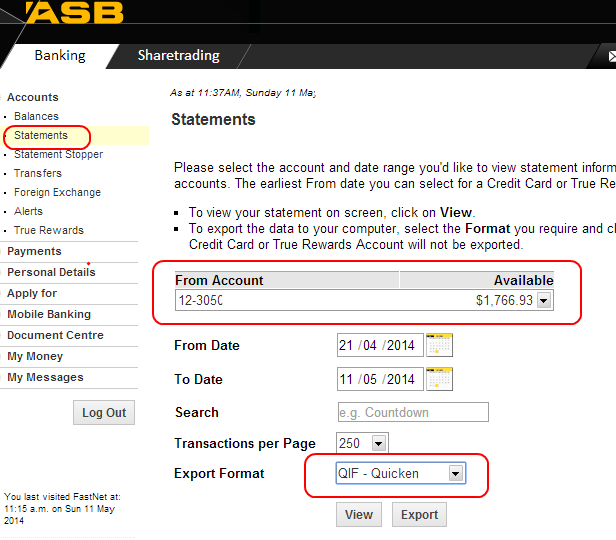
1. Log in to bank
2. Select “Statements”
3. Select bank account
4. Select period
5. Select Export format; which is QIF
6. Export
7. Save (file will save to “Download”
folder
8. Close
(refer item circled in green)
9. Select Downloads
10. Click on File name to change to period bank
statement covers
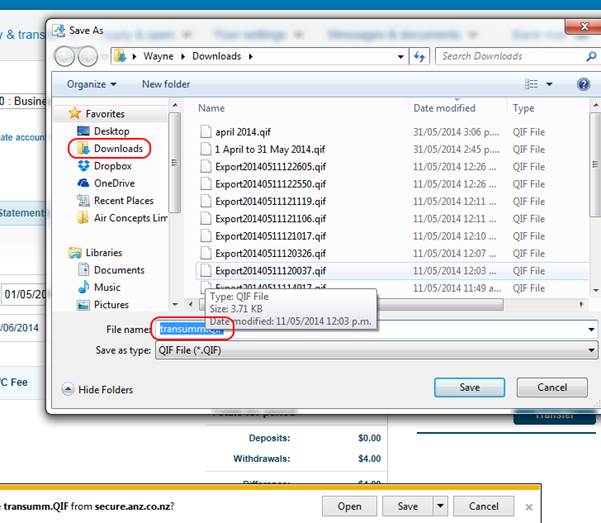
11. Example of name change shown below (do not
change the extension .qif)

12. Click on Save button
13. If this is your first export now is the
time to open a folder where you can save all your bank exported statements
14. Click on Documents
15. Right click anywhere in the blank space
next to the yellow folders
16. On the pop up click on “New”
17. On the next pop up click on “Folder”
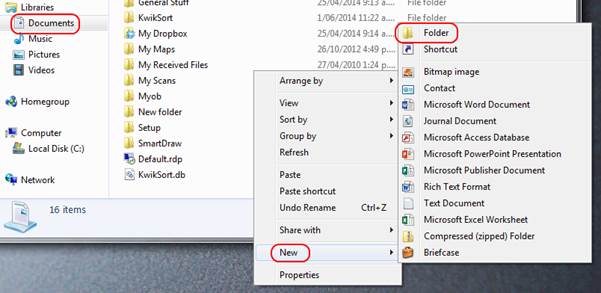
18. A new folder will be created and you can
change to Bank Exports
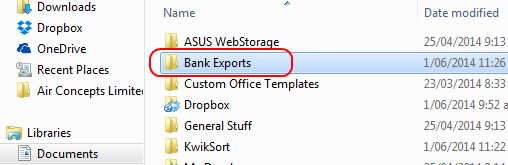
19. Copy your current bank export and all
future bank exports into this folder from the downloads folder
20. You can copy the folder from Downloads by right
clicking on it and selecting copy from the pop up
21. Then go to Documents and select the folder
“Bank Exports”
22. Once opened right click and save

23. Export now complete
24. Logout